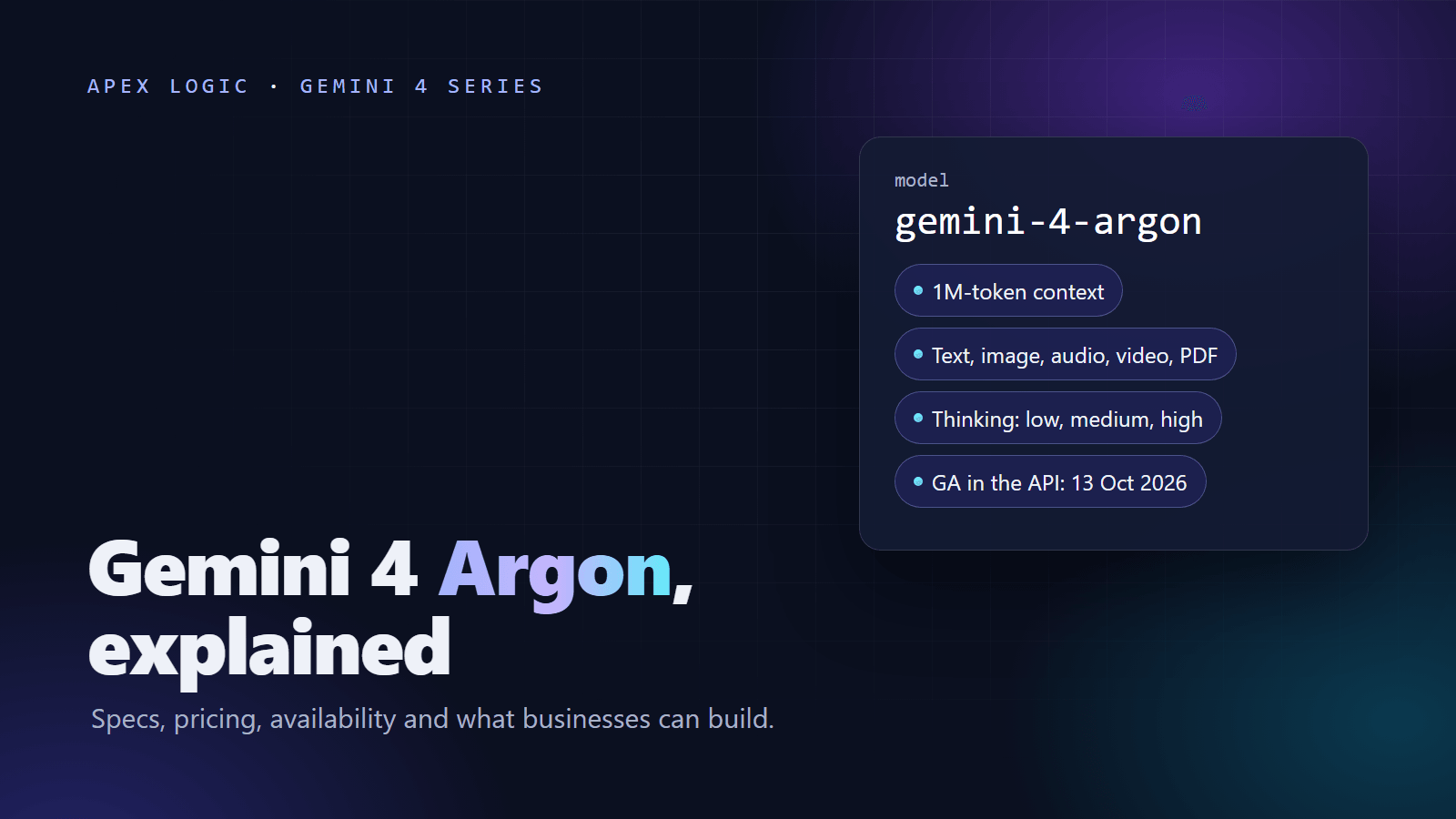
Updated 14 October 2026. Gemini 4 Argon became generally available in the Gemini API on 13 October 2026. Prices change on 1 December 2026; this article shows both.
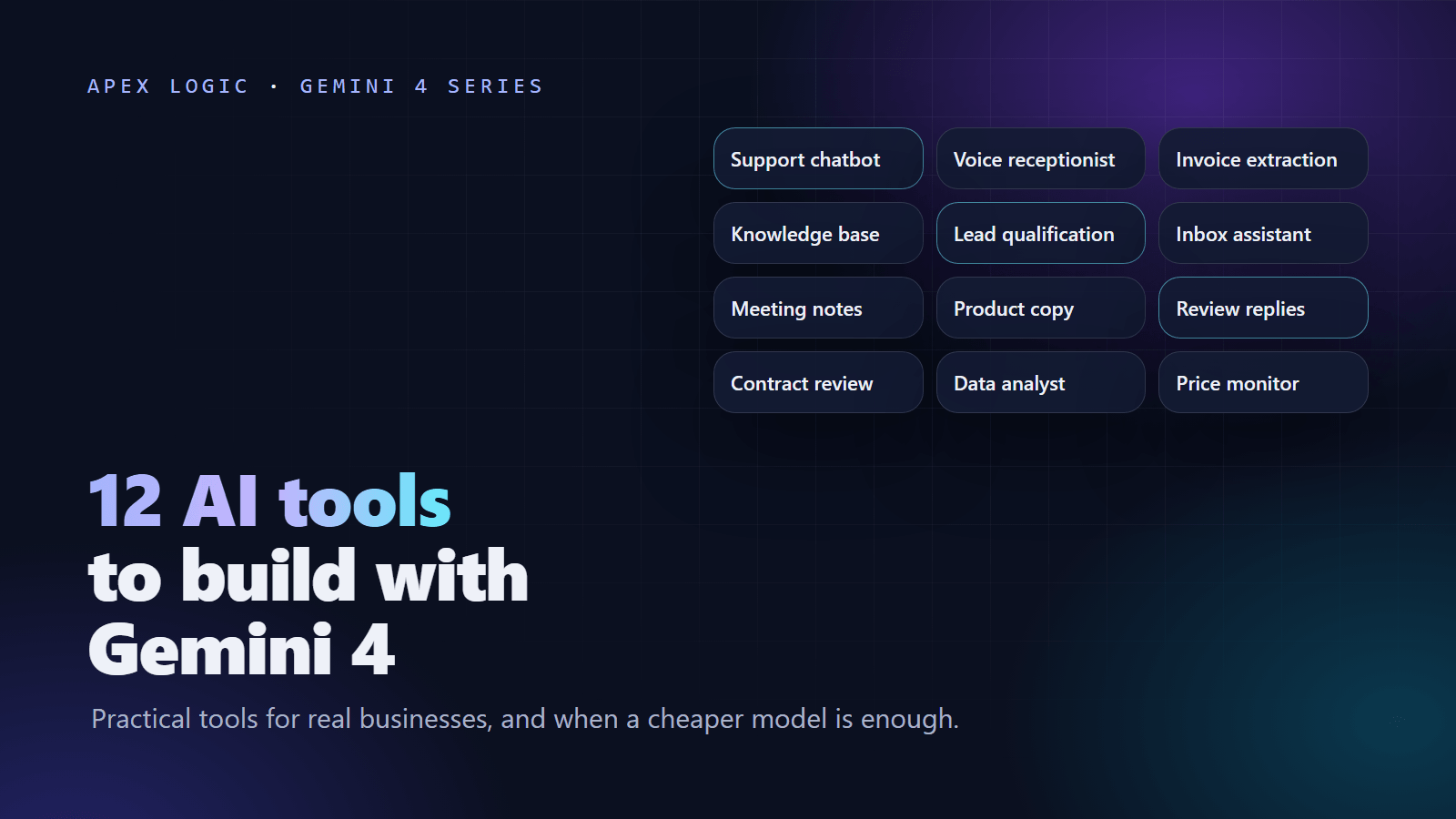
You can build at least 12 practical business tools with Gemini 4 Argon, from a customer support chatbot and an invoice extractor to a contract review assistant and a competitor price monitor. Argon reads text, images, video, audio and PDF, holds up to 1,048,576 tokens of context, and supports structured outputs, function calling, URL context and Google Search grounding. Those features matter most in tools that read long or messy material and then act in your other systems.
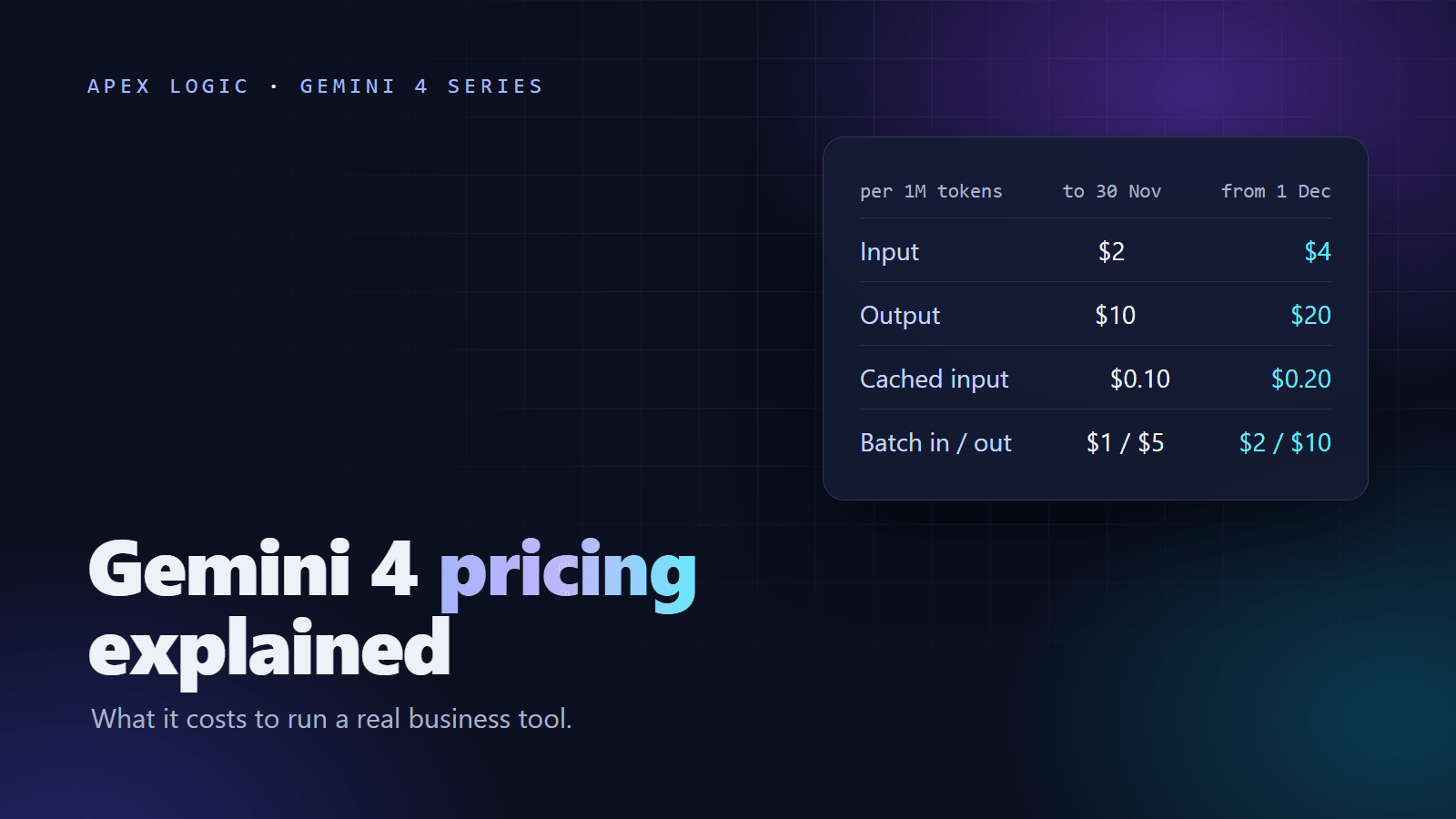
It is not the right engine for every step. Argon outputs text only, its Gemini API version does not support the Live API, and as of 14 October 2026 it costs $2 per 1M input tokens and $10 per 1M output tokens through 30 November 2026, then $4 and $20 from 1 December 2026. So for each tool below, we say which Argon capability helps and when a cheaper model is enough.
What Argon brings to a business tool
- Inputs: text, images, video, audio and PDF. Output is text only.
- Context: 1,048,576 tokens, shared by input, thinking and output.
- Tools: function calling, structured outputs, code execution, file search, URL context, Google Search and Maps grounding, and computer use in Preview.
- Lower-cost options: Batch and Flex at half the standard price ($1 / $5 per 1M tokens through 30 November 2026, $2 / $10 from 1 December), and automatic implicit caching for prompts of at least 4,096 tokens.
- Grounding: 5,000 free Google Search grounding requests a month, shared across Gemini 3 and newer models, then $14 per 1,000.
- Not supported: the Live API, image generation, audio generation and explicit caching.
Google lists hallucinations, occasional slowness or timeouts and dated knowledge in some areas as known limitations, and the knowledge cutoff is March 2026. Where we quote benchmark scores below, they are Google-reported, and most rival scores in Google's table are the providers' own published numbers. For the full background, read our Gemini 4 Argon guide.
1. AI customer support chatbot
A support chatbot answers customer questions from your help center, policies and order data, at any hour. When a case is too complex, it hands over to a person with a short summary.
Where Argon helps: function calling lets it check an order or open a ticket in your own systems. File search and the long context window help keep answers tied to your real help content, and structured outputs produce a clean handoff record. Image and PDF input mean customers can share a photo of a damaged item or a receipt.
When a cheaper model is enough: most support questions are routine, such as delivery times, returns and password resets. A cheaper model can answer those, with Argon kept for long, multi-step cases. More on the AI customer support chatbot page.
2. AI voice receptionist
A voice receptionist answers phone calls, books appointments, answers common questions and takes messages when your staff are busy.
Read this first: Argon outputs text only, and the Gemini API version does not support the Live API. It cannot hear a live call or speak by itself. A voice receptionist built with Argon needs a separate speech-to-text component to transcribe the caller and a separate text-to-speech component to speak the reply. Argon, or a cheaper model, does the reasoning in between.
Where Argon helps: in that middle layer, function calling checks your calendar and books the slot, and structured outputs capture the caller's name, reason and callback number. Because Argon accepts audio input, it can also summarize recorded voicemails.
When a cheaper model is enough: callers expect quick replies. We could not confirm Argon's latency as of 14 October 2026, and Google lists occasional slowness as a known limitation. For simple booking calls, a smaller, cheaper model may fit better, so time both on real call scripts. See the AI voice receptionist page.
3. AI invoice data extraction
An invoice extractor reads supplier invoices and receipts, pulls out the supplier, dates, line items, tax and totals, and sends them to your accounting system. Staff review only the documents that fail a check.
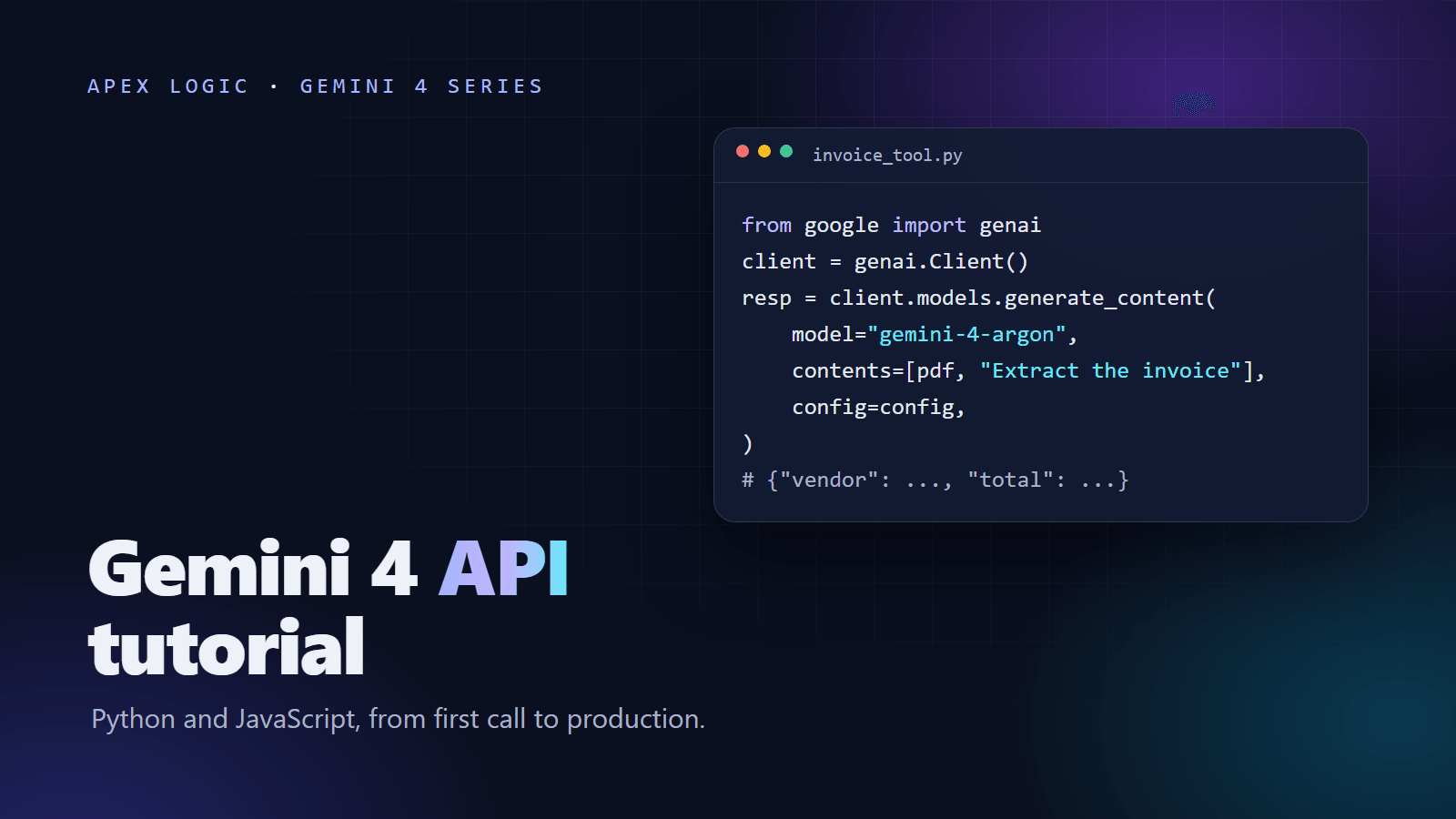
Where Argon helps: it reads PDFs and images directly, including scans and phone photos. Structured outputs return every invoice in the same JSON schema, and function calling can post approved invoices to your accounting software. Overnight runs can use the Batch API at half the standard price.
When a cheaper model is enough: if most invoices come from a few suppliers with clean, consistent layouts, test a cheaper model first. Whichever model you use, check in code that the line items add up to the total. Details are on the AI invoice data extraction page.
4. AI knowledge base assistant
An internal assistant answers staff questions from your handbooks, policies, product manuals and past tickets. Each answer links to the source document, so people can check it.
Where Argon helps: the 1,048,576-token context window can hold large manuals in one request, and file search finds the right passages in bigger collections. On GraphWalks, a Google-reported test of reasoning over 256K to 1M tokens, Argon scored 84.2% against 65.0% to 71.8% for the rivals Google listed. Implicit caching can cut the cost of sending the same long documents again: cached input is $0.10 per 1M tokens through 30 November 2026 and $0.20 from 1 December.
When a cheaper model is enough: for a small handbook and simple questions, a cheaper model with good document search is worth testing first. See the AI knowledge base assistant page.
5. AI lead qualification assistant
It reads new inquiries from forms, email and chat, asks follow-up questions, scores each lead against your criteria and books calls with the promising ones. Your sales team gets a short summary instead of a raw form.
Where Argon helps: URL context lets it read the prospect's website, and Google Search grounding can add public information about the company. Function calling writes the score and summary to your CRM, and structured outputs keep every field consistent.
When a cheaper model is enough: if qualification comes down to a few fixed questions, such as budget, timeline and location, a cheaper model or even simple form rules will do. Argon earns its price when leads arrive as long, unstructured messages. Learn more about the AI lead qualification assistant.
6. AI email inbox assistant
It sorts a shared inbox, tags each email by topic and urgency, drafts replies for a person to approve and copies key details, such as order numbers, into your systems.
Where Argon helps: long threads with attachments. Argon reads PDF and image attachments, follows the whole thread in context and uses function calling to look up the order or customer before drafting. Structured outputs return the tag, priority and extracted fields in a fixed format.
When a cheaper model is enough: sorting and tagging short emails is a classic job for a cheaper model. A sensible design sends every email to the cheaper model first and escalates only long or sensitive threads to Argon. Keep a person approving outgoing replies at the start. See the AI email inbox assistant page.
7. AI meeting notes summarizer
It turns a meeting recording into a summary, decisions and action items with owners, then posts them to your project tool or CRM.
Where Argon helps: Argon accepts audio and video as input, so you can send the recording itself. The long context window leaves room to add the agenda and earlier notes. Structured outputs return action items in a fixed format, and function calling creates the tasks.
When a cheaper model is enough: if your meeting platform already produces a transcript, turning it into short notes is a lighter job that a cheaper model may handle well. Keep Argon for long workshops and calls where detail matters. More on the AI meeting notes summarizer page.
8. AI product description generator
It writes product titles, descriptions, bullet points and meta descriptions from your product data, photos and supplier spec sheets, in your brand's voice.
Where Argon helps: it reads product photos and PDF spec sheets directly, so descriptions can draw on what is actually in the image and the datasheet. Structured outputs return each field separately for your store's import format, and the Batch API halves the token price for large catalogs. Argon cannot create product images; it outputs text only.
When a cheaper model is enough: short descriptions from clean product data suit a cheaper model. Argon is worth it when the source material is long, messy or technical. Either way, check sizes, materials and other facts against your data before publishing. See the AI product description generator page.
9. AI review reply assistant
It drafts replies to customer reviews on your store and on review sites, tags each review by topic and sentiment, and flags complaints that need a manager.
Where Argon helps: structured outputs return the tag, sentiment and draft reply as one consistent record. Image input helps when a customer attaches photos of a problem. Argon is worth its price for long, detailed complaints, where a careless reply could make things worse.
When a cheaper model is enough: most of the time. Short, positive reviews need short, warm replies, and a cheaper model can draft those. Of the 12 tools here, this is the one least likely to need Argon. Keep a person approving replies before they go live. See the AI review reply assistant page.
10. AI contract review assistant
It reads a contract, compares each clause with your playbook, flags risky or missing terms and suggests changes. It speeds up first-pass review, but it does not replace a lawyer, and a qualified lawyer should review its output before you rely on it.
Where Argon helps: it reads PDF contracts, and the long context window holds the agreement, its schedules and your playbook together. Structured outputs return the clause, risk level and suggested wording for each issue. Google says it built Argon for enterprise knowledge work such as legal and finance, and on the Google-reported Harvey Legal Agent Benchmark it scored 19.6% against 3.8% to 6.7% for the rivals listed.
When a cheaper model is enough: pulling simple facts, such as renewal dates, notice periods and party names, is a lighter job worth testing on a cheaper model. For judgment calls, remember that even Argon's top score on that legal benchmark is under 20%, and hallucinations are a known limitation. See the AI contract review assistant page.
11. AI data analyst
Staff ask questions about sales, stock or finance data in plain English and get an answer, the numbers behind it and the query used, so they can check the work.
Where Argon helps: code execution lets it calculate instead of guessing, and function calling can run approved, read-only queries against your database. It also reads PDF reports and CSV exports. On the Google-reported Vals Finance Agent v2 test, Argon scored 65.4% against 53.5% to 58.9% for the rivals listed. Argon returns text, so your app draws the charts from the numbers it sends back.
When a cheaper model is enough: for routine questions over a small, well-documented set of tables, a cheaper model may write good queries. Test it on questions you already know the answers to, and keep database access read-only whichever model you choose. See the AI data analyst page.
12. AI competitor price monitor
It checks competitor product pages on a schedule, records prices and stock status, and alerts you when a change crosses a threshold you set.
Where Argon helps: URL context reads the product pages, Google Search grounding can find listings you did not know about, and structured outputs turn every page into the same price record. For pages that show prices only after clicks, Argon's computer use can operate a browser, but it is still in Preview, so treat it as experimental. Scheduled checks can run on Batch or Flex at half the standard price.
When a cheaper model is enough: if competitor pages are consistent, a plain scraper plus a cheaper model to tidy the data costs less and behaves more predictably. Check each site's terms before you collect anything. See the AI competitor price monitor page.
How to choose your first AI tool
Start with one tool, not twelve. A good first project has four things:
- Volume: a task your team repeats many times a week.
- A clear measure: minutes saved, faster replies or fewer errors.
- Data in reach: the documents or systems it needs are accessible.
- A low cost of mistakes: a person can check the output before it reaches a customer.
Support replies, invoice entry and inbox sorting tick all four boxes for many businesses. Run a pilot with a person checking outputs, measure the result, then add the next tool. Our guide to the cost of building an AI tool with Gemini 4 covers build prices and monthly running costs.
If one of these tools fits your business, browse the AI tools we build or tell us about the task. We can suggest the simplest version worth building first.
Gemini 4 for business FAQ
What can you build with Gemini 4?
Practical business tools such as support chatbots, invoice and document extraction, knowledge base assistants, inbox assistants, meeting summaries, contract review, data analysis and competitor price monitoring. Gemini 4 Argon reads text, images, video, audio and PDF and returns text. It also supports function calling and structured outputs, so it can both understand your documents and take actions in your systems. It cannot generate images or audio.
Can Gemini 4 Argon power a voice assistant or phone bot?
Only as the reasoning layer. Argon outputs text only, and its Gemini API version does not support the Live API, so it cannot hold a live voice conversation by itself. You need a speech-to-text component to transcribe the caller and a text-to-speech component to speak the reply. Argon, or a cheaper model, sits in the middle, deciding what to say and calling your booking or CRM system.
Is Gemini 4 Argon too expensive for small business tools?
It depends on volume, and it is rarely needed for every step. As of 14 October 2026, Argon costs $2 per 1M input tokens and $10 per 1M output tokens through 30 November 2026, then $4 and $20 from 1 December. The Batch and Flex tiers cost half. Many tools can send routine steps to a cheaper model and keep Argon for long documents and complex cases.
Do I need a developer to build these tools?
For a production tool, yes. Calling the API is the easy part. The real work is connecting your systems, handling errors and timeouts, checking outputs, protecting data and building review screens for your staff. Google AI Studio, where Argon is generally available, is a good place to try prompts on your own examples before you commit to a build.
Is Gemini 4 Argon available on the free tier?
No. Gemini 4 Argon is not available on the Gemini API free tier. It became generally available in the paid tier of the Gemini API and in Google AI Studio on 13 October 2026, and on Google Cloud's Gemini Enterprise Agent Platform the same day. People can also use it in the Gemini app with a Google AI Pro or Ultra subscription.
Loading comments...