CRM Automation for Small Business
A practical guide to CRM automation for small business, covering lead capture, follow ups, data hygiene, and real workflows you can set up today.
Calls and meetings are transcribed, summarized and turned into action items with owners and due dates. Summaries go to your CRM or project tool after a quick check by the meeting owner.
After a sales call or a project meeting, someone should write up what was agreed, who owns what and when. Usually nobody does, or the notes are a few rushed lines. A week later the client remembers it differently, tasks slip, and the CRM shows nothing about the deal. Off-the-shelf note takers help, but they store your recordings on their servers and follow their format, not your process.
Example: A small recruitment agency has consultants on calls with candidates and clients all day, and notes in the CRM are thin. With the summarizer, each call is transcribed and turned into a short write-up: role details, salary expectations, notice period and next steps. Candidates are told at the start that the call is recorded. The consultant checks the write-up in Slack, fixes a name or two and approves, and it is filed against the candidate record. Before a client meeting, anyone can search past calls to see what was promised.
A recorder joins your Zoom, Google Meet or Teams calls, or you upload a recording from a phone call or in-person meeting. Participants are told the call is being recorded.
Speech is turned into a transcript with speaker labels and timestamps. A custom vocabulary of your product and client names helps the transcript get your terms right more often.
The AI writes the summary your team wants, for example decisions, open questions, next steps and deal details for sales calls, using a template per meeting type. Each action item gets an owner and a due date where one was mentioned.
The meeting owner gets the draft by email or Slack, corrects anything wrong and approves. Approved notes are filed on the CRM deal or project, and action items become tasks for the right people.
Discovery calls, weekly standups, client reviews and interviews each get their own summary format, so notes look the way your team already expects.
For sales calls, it fills budget, timeline, decision makers and next step on the HubSpot or Salesforce deal, after the rep approves.
Action items become tasks in Asana, Jira, Trello or Notion with an owner and due date, linked back to the moment in the transcript.
Ask "what did we promise this client about delivery?" and get an answer from past meetings, with links to the exact quotes.
For sensitive calls, skip the meeting bot: record locally or upload a file afterwards, and the same summary process runs.
Choose how long recordings and transcripts are kept. You can keep only the approved summary and have the audio deleted automatically after a set period.
This tool uses two kinds of model. Transcription runs on a speech model, such as OpenAI's open-weight Whisper, which we can self-host, or a hosted speech-to-text service. Summaries come from a language model: long workshops suit a Gemini or Claude model with a long context window, while short calls are handled well by smaller, cheaper models. Each step sits behind its own interface, so we can change the speech or summary model as better or cheaper options appear, without touching your integrations.
Typical build: 2 to 4 weeks. Costs scale with the hours of audio you record, covering transcription and summaries, and for a small team they are usually modest; we estimate them from your meeting load.
A version that takes uploads or joins one meeting platform, writes summaries in your formats and sends them to one CRM or project tool starts from $1,500. Joining several platforms, search across past meetings or self-hosted transcription add scope. You get a fixed quote, and unlike per-seat note takers, there is no monthly license per user, only usage and hosting.
No. A meeting bot is the easiest option for Zoom, Meet and Teams, but some clients dislike seeing one. You can instead record with the platform's own recording feature and let the tool pick up the file afterwards, or upload audio from phone calls and in-person meetings. The summary and filing steps are the same either way.
Most builds take 2 to 4 weeks. Upload-based summaries can be working in the first week. Joining live meetings automatically and writing into your CRM take longer, because each platform has its own permissions and approval steps. We tune the summary templates on a handful of your real recordings before launch.
It can mishear names, mix up speakers or miss the nuance of a decision, especially with poor audio or people talking over each other. That is why the meeting owner approves each summary before it is filed, and every point links to the transcript moment it came from. A quick check takes far less time than writing notes from memory.
Recordings, transcripts and summaries are stored in your own cloud account, in the region you choose, with a deletion schedule you set. Transcription can run on a self-hosted model, so audio never leaves your servers. Summaries use an API model under no-training terms, or an open-weight model if you prefer. Consent rules differ by country, so the tool announces recording; confirm what your local rules require.
Reply to every new lead in minutes and spend sales time on the ones likely to buy
2 to 4 weeksFrom $1,500 → OperationsStaff ask a question and get an answer from your own documents, with the source linked
3 to 5 weeksFrom $1,500 → Customer serviceAnswers the phone when your team cannot, books appointments and takes clear messages
4 to 6 weeksFrom $3,000 →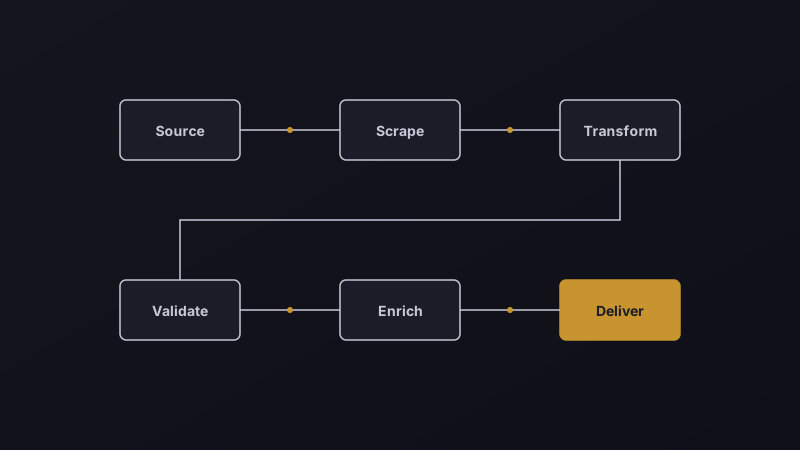
A practical guide to CRM automation for small business, covering lead capture, follow ups, data hygiene, and real workflows you can set up today.

Running your own model sounds cheaper and more private. Sometimes it is. Often it is neither.
The best AI tools for small business in 2026 — but instead of an overwhelming list of 18, here is a prioritised starter stack by business type, when to build custom AI instead, the hidden costs, and a 30/60/90-day rollout plan.
Send us a few real examples of the task. You get a written scope, a fixed price and a timeline within two working days.